FIELD NOTES / 技术札记
生成打卡图片
go | html 生成打卡图片
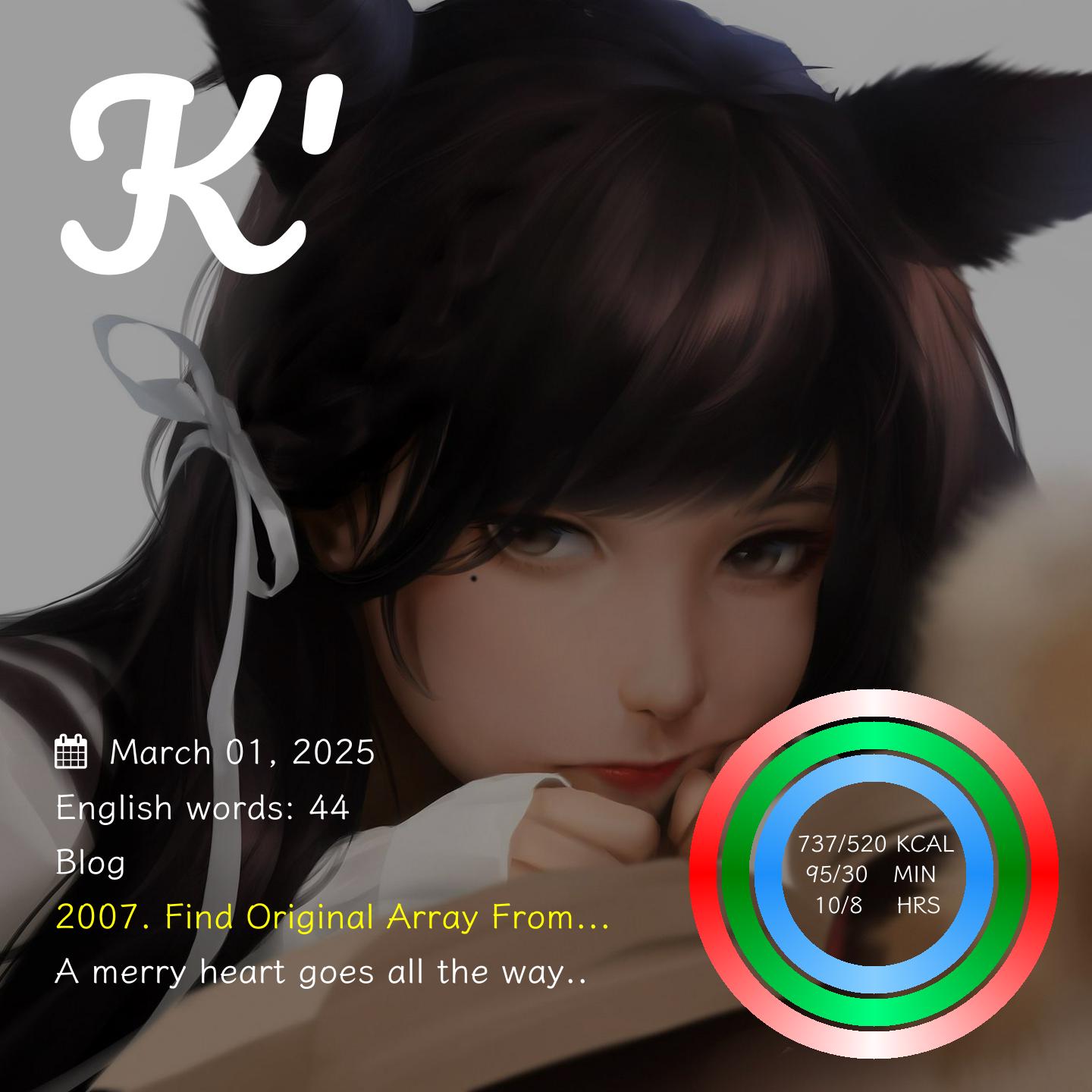
大体效果如下~
go 版本
第一版
package main

import (
        _ "embed"
        "encoding/json"
        "fmt"
        "image"
        "image/color"
        "image/draw"
        "image/jpeg"
        "image/png"
        "io"
        "log"
        "math"
        "net/http"
        "os"
        "path/filepath"
        "strings"
        "test0405/img"
        "time"

        "golang.org/x/image/colornames"
        "golang.org/x/image/font"
        "golang.org/x/image/font/opentype"
        "golang.org/x/image/font/sfnt"
        "golang.org/x/image/math/fixed"
)

//go:embed Pacifico-Regular.ttf
var PACIFICO_TTF_SOURCE string
var PACIFICO_TTF *sfnt.Font

//go:embed fontawesome-webfont.ttf
var AWESOME_REGULAR_TTF_SOURCE string
var AWESOME_REGULAR_TTF *sfnt.Font

//go:embed KleeOne-SemiBold.ttf
var KLEE_ONE_TTF_SOURCE string
var KLEE_ONE_TTF *sfnt.Font

func init() {
        var err error
        PACIFICO_TTF, err = opentype.Parse([]byte(PACIFICO_TTF_SOURCE))
        if err != nil {
                panic(err)
        }
        AWESOME_REGULAR_TTF, err = opentype.Parse([]byte(AWESOME_REGULAR_TTF_SOURCE))
        if err != nil {
                panic(err)
        }
        KLEE_ONE_TTF, err = opentype.Parse([]byte(KLEE_ONE_TTF_SOURCE))
        if err != nil {
                panic(err)
        }
}

func readImg(path string) image.Image {
        // 打开背景图片
        file, err := os.Open(path)
        if err != nil {
                panic(err)
        }
        defer file.Close()
        var img image.Image
        if filepath.Ext(path) == "png" {
                img, err = png.Decode(file)
        } else {
                img, _, err = image.Decode(file)
        }

        if err != nil {
                panic(err)
        }
        return img
}

func min(a, b int) int {
        if a < b {
                return a
        }
        return b
}

func main() {
        // img.Cut("wallhaven-zyrq1v.jpg")
        // img.Resize("wallhaven-6dz777.png")
        img.Resize("wallhaven-725qz3.jpeg")
        bgImg := readImg("bg.png")

        width, height := bgImg.Bounds().Max.X, bgImg.Bounds().Max.Y
        fmt.Println(width, height)

        // 创建一个新的 RGBA 图片,大小与背景图片相同
        rgba := image.NewRGBA(bgImg.Bounds())

        // 将背景图片绘制到 RGBA 图片上
        draw.Draw(rgba, bgImg.Bounds(), bgImg, image.Point{}, draw.Src)

        // 绘制黑色半透明遮罩
        black := color.RGBA{0, 0, 0, 97} // 0.3 * 255 = 76,这里的 76 为黑色透明度
        draw.Draw(rgba, rgba.Bounds(), &image.Uniform{black}, image.Point{}, draw.Over)

        drawTitle(rgba, width, height)
        drawCalendar(rgba, width, height)
        drawWork(rgba, width, height, []string{"English words: 44", "Blog", "2007. Find Original Array From..."})

        drawHealthData(rgba, width, height)
        if err := drawEnglish(rgba, width, height); err != nil {
                panic(err)
        }
        // 将生成的图片保存到文件
        outputFile, err := os.Create("output.jpg")
        if err != nil {
                panic(err)
        }
        defer outputFile.Close()
        jpeg.Encode(outputFile, rgba, nil)
}

func getFace(f *opentype.Font, size float64) font.Face {
        face, err := opentype.NewFace(f, &opentype.FaceOptions{
                Size:    size,
                DPI:     size * 3,
                Hinting: font.HintingFull,
        })
        if err != nil {
                panic(err)
        }
        return face
}

func drawTitle(img *image.RGBA, width, height int) {
        size := float64(min(width, height)) * 0.06
        face := getFace(PACIFICO_TTF, size)
        x, y := float64(width)*0.05, float64(height)*0.25
        d := &font.Drawer{
                Dst:  img,
                Src:  image.NewUniform(color.White),
                Face: face,
                Dot: fixed.Point26_6{
                        X: fixed.Int26_6(x * 64),
                        Y: fixed.Int26_6(y * 64),
                },
        }
        d.DrawString("K'")
}

func drawCalendar(img *image.RGBA, width, height int) {
        m := min(width, height)

        size := float64(m) * 0.15 / 6.5
        // 绘制日历
        face := getFace(AWESOME_REGULAR_TTF, size)
        x, y := int(float64(width)*0.05), int(float64(height)*0.7)
        d := &font.Drawer{
                Dst:  img,
                Src:  image.NewUniform(color.White),
                Face: face,
                Dot: fixed.Point26_6{
                        X: fixed.Int26_6(x * 64),
                        Y: fixed.Int26_6(y * 64),
                },
        }
        d.DrawString("\uf073")
        // 绘制时间
        face = getFace(KLEE_ONE_TTF, size)
        x = int(float64(width) * 0.1)
        d = &font.Drawer{
                Dst:  img,
                Src:  image.NewUniform(color.White),
                Face: face,
                Dot: fixed.Point26_6{
                        X: fixed.Int26_6(x * 64),
                        Y: fixed.Int26_6(y * 64),
                },
        }
        time := time.Now().Format("January 02, 2006")
        d.DrawString(time)
}

func drawLeetcode(img *image.RGBA, width, height int, works []string) {
        data := `{"query":"\n    query questionOfToday {\n  todayRecord {\n    date\n    userStatus\n    question {\n      questionId\n      frontendQuestionId: questionFrontendId\n      difficulty\n      title\n      titleCn: translatedTitle\n      titleSlug\n      paidOnly: isPaidOnly\n      freqBar\n      isFavor\n      acRate\n      status\n      solutionNum\n      hasVideoSolution\n      topicTags {\n        name\n        nameTranslated: translatedName\n        id\n      }\n      extra {\n        topCompanyTags {\n          imgUrl\n          slug\n          numSubscribed\n        }\n      }\n    }\n    lastSubmission {\n      id\n    }\n  }\n}\n    ","variables":{},"operationName":"questionOfToday"}`
        resp, err := http.Post("https://leetcode.cn/graphql/", "application/json", strings.NewReader(data))
        if err != nil {
                log.Fatalln(err.Error())
                return
        }
        defer resp.Body.Close()
        body, err := io.ReadAll(resp.Body)
        if err != nil {
                log.Fatalln(err.Error())
                return
        }
        type Question struct {
                QuestionId string `json:"questionId"`
                Difficulty string `json:"difficulty"`
                Title      string `json:"title"`
        }
        type Record struct {
                Question Question `json:"question"`
        }
        type Data struct {
                TodayRecord []Record `json:"todayRecord"`
        }
        type Rsp struct {
                Data Data `json:"data"`
        }
        var rsp Rsp
        if err = json.Unmarshal(body, &rsp); err != nil {
                log.Fatalln(err.Error())
                return
        }
        records := rsp.Data.TodayRecord
        if len(records) == 0 {
                log.Fatalln("no record")
                return
        }
        // question := rsp.Data.TodayRecord[0].Question
        // return question.QuestionId + ". " + question.Title, nil
        return
}

func drawWork(img *image.RGBA, width, height int, works []string) {
        m := min(width, height)
        size := float64(m) * 0.15 / 6.5
        // 绘制日历
        face := getFace(KLEE_ONE_TTF, size)
        for i, work := range works {
                x, y := int(float64(width)*0.05), int(float64(height)*(0.75+0.05*float64(i)))
                col := image.NewUniform(color.White)
                if strings.Contains(work, ".") {
                        col = image.NewUniform(colornames.Yellow)
                }
                d := &font.Drawer{
                        Dst:  img,
                        Src:  col,
                        Face: face,
                        Dot: fixed.Point26_6{
                                X: fixed.Int26_6(x * 64),
                                Y: fixed.Int26_6(y * 64),
                        },
                }
                d.DrawString(work)
        }
}

func drawHealthData(img *image.RGBA, width, height int) {
        kcal, exercise, stand := 737, 95, 10
        kcalTotal, exerciseTotal, standTotal := 520, 30, 8

        x := int(float64(width) * 0.73)
        size := float64(min(width, height)) * 0.15 / 8
        face := getFace(KLEE_ONE_TTF, size)
        y := int(float64(height) * 0.78)
        d := &font.Drawer{
                Dst:  img,
                Src:  image.NewUniform(color.White),
                Face: face,
                Dot: fixed.Point26_6{
                        X: fixed.Int26_6(x * 64),
                        Y: fixed.Int26_6(y * 64),
                },
        }
        d.DrawString(fmt.Sprintf("%3d/%3d KCAL", kcal, kcalTotal))
        y = int(float64(height)*0.78) + int(size*1.5)
        d = &font.Drawer{
                Dst:  img,
                Src:  image.NewUniform(color.White),
                Face: face,
                Dot: fixed.Point26_6{
                        X: fixed.Int26_6(x * 64),
                        Y: fixed.Int26_6(y * 64),
                },
        }
        d.DrawString(fmt.Sprintf("%3d/%2d   MIN", exercise, exerciseTotal))
        y = int(float64(height)*0.78) + int(size*3)
        d = &font.Drawer{
                Dst:  img,
                Src:  image.NewUniform(color.White),
                Face: face,
                Dot: fixed.Point26_6{
                        X: fixed.Int26_6(x * 64),
                        Y: fixed.Int26_6(y * 64),
                },
        }
        d.DrawString(fmt.Sprintf("  %2d/%d    HRS", stand, standTotal))

        x, y = int(float64(width)*0.8), int(float64(height)*0.8)
        m := float64(min(width, height))

        drawRing(img, x, y, int(m*0.17), int(m*0.025), color.RGBA{255, 0, 0, 255}, color.RGBA{255, 251, 251, 255}, float64(kcal)/float64(kcalTotal))
        drawRing(img, x, y, int(m*0.14), int(m*0.025), color.RGBA{0, 128, 0, 255}, color.RGBA{0, 255, 127, 255}, float64(exercise)/float64(exerciseTotal))
        drawRing(img, x, y, int(m*0.11), int(m*0.025), color.RGBA{30, 144, 250, 255}, color.RGBA{135, 206, 255, 255}, float64(stand)/float64(standTotal))

}

// 绘制圆环
// img 图纸
// x, y 中心点
// r 半径
// startColor, endColor 开始、结束颜色
// percent 圆环百分比
func drawRing(img *image.RGBA, x, y, r, thickness int, startColor, endColor color.RGBA, percent float64) {
        abs := func(num float64) float64 {
                if num < 0 {
                        return -num
                }
                return num
        }
        angle := func(x, y int) float64 {
                angle := math.Atan2(float64(x), float64(-y))
                if angle < 0 {
                        angle += 2 * math.Pi
                }
                return angle
        }
        for i := -r; i <= r; i++ {
                for j := -r; j <= r; j++ {
                        // 不处于圆环不绘制
                        if i*i+j*j > r*r || math.Sqrt(float64(i*i+j*j)) < float64(r-thickness) {
                                continue
                        }
                        // 小于半径根据角度计算颜色
                        if angle(i, j) > 2*math.Pi*percent {
                                continue
                        }
                        p := abs(math.Atan(float64(j)/float64(i))) * 2 / math.Pi
                        color := color.RGBA{
                                startColor.R + uint8(float64(endColor.R-startColor.R)*p),
                                startColor.G + uint8(float64(endColor.G-startColor.G)*p),
                                startColor.B + uint8(float64(endColor.B-startColor.B)*p),
                                255,
                        }
                        img.Set(x+i, y+j, color)
                }
        }
}

func drawEnglish(img *image.RGBA, width, height int) error {
        url := "http://open.iciba.com/dsapi"
        resp, err := http.Get(url)
        if err != nil {
                return err
        }
        defer resp.Body.Close()

        body, err := io.ReadAll(resp.Body)
        if err != nil {
                return err
        }
        type Rsp struct {
                Content string `json:"content"`
        }
        var rsp Rsp
        err = json.Unmarshal(body, &rsp)
        if err != nil {
                return err
        }
        content := rsp.Content

        size := float64(min(width, height)) * 0.15 / 6.5
        face := getFace(KLEE_ONE_TTF, size)
        nContents := []string{}

        // contents := strings.Split(content, ".")
        contents := []string{content[:len(content)-1]}
        for _, content := range contents {
                if content == "" {
                        continue
                }
                content += "."
                words := strings.Split(content, " ")
                temp := ""
                for _, word := range words {
                        if word == "" {
                                continue
                        }
                        if len(temp)+len(word) > 40 {
                                nContents = append(nContents, temp)
                                temp = ""
                        }
                        if len(temp) > 0 {
                                temp += " "
                        }
                        temp += word
                }
                if len(temp) > 0 {
                        nContents = append(nContents, temp)
                }
        }
        contents = nContents
        for i, c := range contents {
                if c == "" {
                        continue
                }
                x, y := int(float64(width)*0.05), int(float64(height)*0.9)+int(size*float64(i))
                d := &font.Drawer{
                        Dst:  img,
                        Src:  image.NewUniform(color.White),
                        Face: face,
                        Dot: fixed.Point26_6{
                                X: fixed.Int26_6(x * 64),
                                Y: fixed.Int26_6(y * 64),
                        },
                }
                d.DrawString(c)
        }
        // d.DrawString(content)
        return nil
}
第二版
package main
import (
_ "embed"
"encoding/json"
"fmt"
"image"
"image/color"
"image/draw"
"image/jpeg"
"image/png"
"io"
"math"
"net/http"
"os"
"path/filepath"
"strings"
"test0405/img"
"time"
"golang.org/x/image/colornames"
"golang.org/x/image/font"
"golang.org/x/image/font/opentype"
"golang.org/x/image/font/sfnt"
"golang.org/x/image/math/fixed"
)
//go:embed Pacifico-Regular.ttf
var PACIFICO_TTF_SOURCE string
var PACIFICO_TTF *sfnt.Font
//go:embed fontawesome-webfont.ttf
var AWESOME_REGULAR_TTF_SOURCE string
var AWESOME_REGULAR_TTF *sfnt.Font
//go:embed fa-solid-900.ttf
var AWESOME_SOLID_TTF_SOURCE string
var AWESOME_SOLID_TTF *sfnt.Font
//go:embed KleeOne-SemiBold.ttf
var KLEE_ONE_TTF_SOURCE string
var KLEE_ONE_TTF *sfnt.Font
//go:embed TaiWanQuanZiKu.ttf
var TAIWAN_QUANZI_KU_TTF_SOURCE string
var TAIWAN_QUANZI_KU_TTF *sfnt.Font
//go:embed RampartOne-Regular.ttf
var RAMPTONE_TTF_SOURCE string
var RAMPTONE_TTF *sfnt.Font
func init() {
var err error
PACIFICO_TTF, err = opentype.Parse([]byte(PACIFICO_TTF_SOURCE))
if err != nil {
panic(err)
}
AWESOME_REGULAR_TTF, err = opentype.Parse([]byte(AWESOME_REGULAR_TTF_SOURCE))
if err != nil {
panic(err)
}
AWESOME_SOLID_TTF, err = opentype.Parse([]byte(AWESOME_SOLID_TTF_SOURCE))
if err != nil {
panic(err)
}
KLEE_ONE_TTF, err = opentype.Parse([]byte(KLEE_ONE_TTF_SOURCE))
if err != nil {
panic(err)
}
TAIWAN_QUANZI_KU_TTF, err = opentype.Parse([]byte(TAIWAN_QUANZI_KU_TTF_SOURCE))
if err != nil {
panic(err)
}
RAMPTONE_TTF, err = opentype.Parse([]byte(RAMPTONE_TTF_SOURCE))
if err != nil {
panic(err)
}
}
func readImg(path string) image.Image {
// 打开背景图片
file, err := os.Open(path)
if err != nil {
panic(err)
}
defer file.Close()
var img image.Image
if filepath.Ext(path) == "png" {
img, err = png.Decode(file)
} else {
img, _, err = image.Decode(file)
}
if err != nil {
panic(err)
}
return img
}
func min(a, b int) int {
if a < b {
return a
}
return b
}
func main() {
// img.Cut("wallhaven-zyrq1v.jpg")
// img.Resize("wallhaven-6dz777.png")
// img.Resize("wallhaven-2kpe5y.jpg")
img.Resize("wallhaven-k7y68m.png")
bgImg := readImg("bg.png")
width, height := bgImg.Bounds().Max.X, bgImg.Bounds().Max.Y
fmt.Println(width, height)
// 创建一个新的 RGBA 图片,大小与背景图片相同
rgba := image.NewRGBA(bgImg.Bounds())
// 将背景图片绘制到 RGBA 图片上
draw.Draw(rgba, bgImg.Bounds(), bgImg, image.Point{}, draw.Src)
// 绘制黑色半透明遮罩
black := color.RGBA{0, 0, 0, 97} // 0.3 * 255 = 76,这里的 76 为黑色透明度
draw.Draw(rgba, rgba.Bounds(), &image.Uniform{black}, image.Point{}, draw.Over)
drawRectangle(width, height, 0.02, 0.43, 0.96, 0.4, rgba) // 新闻框
drawRectangle(width, height, 0.52, 0.2, 0.46, 0.185, rgba) // LeetCode日历框
// 绘制标题、天气、LeetCode日历、日历、工作内容
drawTitle(rgba, width, height)
drawWeather(rgba, width, height)
drawLeetCodeCalendar(rgba, width, height)
drawCalendar(rgba, width, height)
drawWork(rgba, width, height, []string{`1. OpenAI开放语言模型最快下周亮相`, `2. 英伟达市值达4万亿美元,创历史新高`, `3. 微软35%新产品代码由AI编写`, `4. Meta收购雷朋母公司股权,加码AI智能眼镜`, `5. 苹果计划2025年推出升级版Vision Pro`, `6. 美国设立AI教育学院,培训40万教师`, `7. OpenAI等资助AI教师培训,总额2300万美元`})
// 将生成的图片保存到文件
outputFile, err := os.Create("output.jpg")
if err != nil {
panic(err)
}
defer outputFile.Close()
jpeg.Encode(outputFile, rgba, nil)
}
func drawRectangle(width, height int, startPercentX, startPercentY, widthPercent, heightPercent float64, rgba *image.RGBA) {
// 绘制一个圆角的灰色透明矩形,使用 draw.Draw 绘制,透明度为 0.7
rectX := int(float64(width) * startPercentX)
rectY := int(float64(height) * startPercentY)
rectWidth := int(float64(width) * widthPercent)
rectHeight := int(float64(height) * heightPercent)
radius := int(float64(min(rectWidth, rectHeight)) * 0.1) // 圆角半径
// 创建一个灰色半透明颜色
grayColor := color.RGBA{0, 0, 0, 100} // 0.7 * 255 = 178.5 约等于 179,这里的 179 为灰色透明度
// 创建圆角矩形遮罩
mask := image.NewAlpha(image.Rect(0, 0, width, height))
// 绘制圆角矩形到遮罩上
for y := 0; y < height; y++ {
for x := 0; x < width; x++ {
// 检查点是否在矩形范围内
if x >= rectX && x < rectX+rectWidth && y >= rectY && y < rectY+rectHeight {
// 检查是否在四个角的圆角区域内
inRect := true
// 左上角
if x < rectX+radius && y < rectY+radius {
dx := float64(rectX + radius - x)
dy := float64(rectY + radius - y)
inRect = (dx*dx + dy*dy) <= float64(radius*radius)
}
// 右上角
if x >= rectX+rectWidth-radius && y < rectY+radius {
dx := float64(x - (rectX + rectWidth - radius - 1))
dy := float64(rectY + radius - y)
inRect = (dx*dx + dy*dy) <= float64(radius*radius)
}
// 左下角
if x < rectX+radius && y >= rectY+rectHeight-radius {
dx := float64(rectX + radius - x)
dy := float64(y - (rectY + rectHeight - radius - 1))
inRect = (dx*dx + dy*dy) <= float64(radius*radius)
}
// 右下角
if x >= rectX+rectWidth-radius && y >= rectY+rectHeight-radius {
dx := float64(x - (rectX + rectWidth - radius - 1))
dy := float64(y - (rectY + rectHeight - radius - 1))
inRect = (dx*dx + dy*dy) <= float64(radius*radius)
}
if inRect {
mask.SetAlpha(x, y, color.Alpha{255})
}
}
}
}
// 使用遮罩绘制灰色半透明矩形
draw.DrawMask(rgba, rgba.Bounds(), &image.Uniform{grayColor}, image.Point{}, mask, image.Point{}, draw.Over)
}
func getFace(f *opentype.Font, size float64) font.Face {
face, err := opentype.NewFace(f, &opentype.FaceOptions{
Size: size,
DPI: size * 3,
Hinting: font.HintingFull,
})
if err != nil {
panic(err)
}
return face
}
func drawTitle(img *image.RGBA, width, height int) {
size := float64(min(width, height)) * 0.04
face := getFace(PACIFICO_TTF, size)
x, y := float64(width)*0.77, float64(height)*0.9
d := &font.Drawer{
Dst: img,
Src: image.NewUniform(color.White),
Face: face,
Dot: fixed.Point26_6{
X: fixed.Int26_6(x * 64),
Y: fixed.Int26_6(y * 64),
},
}
d.DrawString("42tr")
}
func drawLeetCodeTitle(img *image.RGBA, width, height int) {
size := float64(min(width, height)) * 0.03
face := getFace(RAMPTONE_TTF, size)
x, y := float64(width)*0.58, float64(height)*0.24
d := &font.Drawer{
Dst: img,
Src: image.NewUniform(color.White),
Face: face,
Dot: fixed.Point26_6{
X: fixed.Int26_6(x * 64),
Y: fixed.Int26_6(y * 64),
},
}
d.DrawString("LeetCode")
}
func drawLeetCodeCalendar(img *image.RGBA, width, height int) {
drawLeetCodeTitle(img, width, height)
m := min(width, height)
size := float64(m) * 0.12 / 6.5
face := getFace(AWESOME_SOLID_TTF, size)
x, y := float64(width)*0.58, float64(height)*0.27
cal := [32]int{}
cal[0] = -1
cal[9] = 1
cal[10] = 1
cal[11] = 1
cal[12] = 2
cal[13] = 1
cal[14] = 1
doneColor := image.NewUniform(colornames.Greenyellow)
for i, done := range cal {
if done == -1 {
continue
}
color := image.NewUniform(color.White)
if done == 1 {
color = doneColor
} else if done == 2 {
color = image.NewUniform(colornames.Red)
}
xx := x + float64(i%7)*float64(m)*0.33/6.5
yy := y + float64(i/7)*float64(m)*0.33/6.5
d := &font.Drawer{
Dst: img,
Src: color,
Face: face,
Dot: fixed.Point26_6{
X: fixed.Int26_6(xx * 64),
Y: fixed.Int26_6(yy * 64),
},
}
d.DrawString("\uf111")
}
}
func drawWeather(img *image.RGBA, width, height int) {
m := min(width, height)
size := float64(m) * 0.2 / 6.5
face := getFace(AWESOME_SOLID_TTF, size)
bigSize := float64(m) * 0.3 / 6.5
bigFace := getFace(AWESOME_SOLID_TTF, bigSize)
x, y := float64(width)*0.06, float64(height)*0.18
d := &font.Drawer{
Dst: img,
Src: image.NewUniform(color.White),
Face: bigFace,
Dot: fixed.Point26_6{
X: fixed.Int26_6(x * 64),
Y: fixed.Int26_6(y * 64),
},
}
d.DrawString("\uf185")
x = float64(width) * 0.15
for i := range []int{0, 1, 2} {
x += float64(width) * 0.06
d = &font.Drawer{
Dst: img,
Src: image.NewUniform(color.White),
Face: face,
Dot: fixed.Point26_6{
X: fixed.Int26_6(x * 64),
Y: fixed.Int26_6(y * 64),
},
}
if i == 0 {
d.DrawString("\uf185")
} else {
d.DrawString("\uf73d")
}
}
}
func drawCalendar(img *image.RGBA, width, height int) {
m := min(width, height)
size := float64(m) * 0.25 / 6.5
// 绘制日历
face := getFace(AWESOME_REGULAR_TTF, size)
x, y := int(float64(width)*0.05), int(float64(height)*0.1)
d := &font.Drawer{
Dst: img,
Src: image.NewUniform(color.White),
Face: face,
Dot: fixed.Point26_6{
X: fixed.Int26_6(x * 64),
Y: fixed.Int26_6(y * 64),
},
}
d.DrawString("\uf073")
// 绘制时间
face = getFace(KLEE_ONE_TTF, size)
x = int(float64(width) * 0.15)
d = &font.Drawer{
Dst: img,
Src: image.NewUniform(color.White),
Face: face,
Dot: fixed.Point26_6{
X: fixed.Int26_6(x * 64),
Y: fixed.Int26_6(y * 64),
},
}
time := time.Now().Format("January 02, 2006")
d.DrawString(time)
}
func drawWork(img *image.RGBA, width, height int, works []string) {
m := min(width, height)
size := float64(m) * 0.2 / 6.5
faceTitle := getFace(TAIWAN_QUANZI_KU_TTF, float64(m)*0.19/6.5)
faceContent := getFace(TAIWAN_QUANZI_KU_TTF, float64(m)*0.17/6.5)
y := int(float64(height) * 0.48)
for _, work := range works {
if work == "" {
continue
}
// Determine color based on content
col := image.NewUniform(colornames.Violet)
face := faceContent
if strings.Contains(work, ".") {
col = image.NewUniform(colornames.Yellow)
face = faceTitle
}
// Split work into chunks of max 30 characters
var chunks []string
work := []rune(work)
for len(work) > 0 {
chunkSize := min(28, len(work))
chunks = append(chunks, string(work[:chunkSize]))
work = work[chunkSize:]
}
// Draw each chunk on a separate line
for _, chunk := range chunks {
x := int(float64(width) * 0.07)
d := &font.Drawer{
Dst: img,
Src: col,
Face: face,
Dot: fixed.Point26_6{
X: fixed.Int26_6(x * 64),
Y: fixed.Int26_6(y * 64),
},
}
d.DrawString(chunk)
// Move to next line with appropriate spacing
y += int(size * 1.5)
}
// Add some extra spacing between different work items
y += int(size * 0.5)
}
}
func drawHealthData(img *image.RGBA, width, height int) {
kcal, exercise, stand := 737, 95, 10
kcalTotal, exerciseTotal, standTotal := 520, 30, 8
x := int(float64(width) * 0.73)
size := float64(min(width, height)) * 0.15 / 8
face := getFace(KLEE_ONE_TTF, size)
y := int(float64(height) * 0.78)
d := &font.Drawer{
Dst: img,
Src: image.NewUniform(color.White),
Face: face,
Dot: fixed.Point26_6{
X: fixed.Int26_6(x * 64),
Y: fixed.Int26_6(y * 64),
},
}
d.DrawString(fmt.Sprintf("%3d/%3d KCAL", kcal, kcalTotal))
y = int(float64(height)*0.78) + int(size*1.5)
d = &font.Drawer{
Dst: img,
Src: image.NewUniform(color.White),
Face: face,
Dot: fixed.Point26_6{
X: fixed.Int26_6(x * 64),
Y: fixed.Int26_6(y * 64),
},
}
d.DrawString(fmt.Sprintf("%3d/%2d MIN", exercise, exerciseTotal))
y = int(float64(height)*0.78) + int(size*3)
d = &font.Drawer{
Dst: img,
Src: image.NewUniform(color.White),
Face: face,
Dot: fixed.Point26_6{
X: fixed.Int26_6(x * 64),
Y: fixed.Int26_6(y * 64),
},
}
d.DrawString(fmt.Sprintf(" %2d/%d HRS", stand, standTotal))
x, y = int(float64(width)*0.8), int(float64(height)*0.8)
m := float64(min(width, height))
drawRing(img, x, y, int(m*0.17), int(m*0.025), color.RGBA{255, 0, 0, 255}, color.RGBA{255, 251, 251, 255}, float64(kcal)/float64(kcalTotal))
drawRing(img, x, y, int(m*0.14), int(m*0.025), color.RGBA{0, 128, 0, 255}, color.RGBA{0, 255, 127, 255}, float64(exercise)/float64(exerciseTotal))
drawRing(img, x, y, int(m*0.11), int(m*0.025), color.RGBA{30, 144, 250, 255}, color.RGBA{135, 206, 255, 255}, float64(stand)/float64(standTotal))
}
// 绘制圆环
// img 图纸
// x, y 中心点
// r 半径
// startColor, endColor 开始、结束颜色
// percent 圆环百分比
func drawRing(img *image.RGBA, x, y, r, thickness int, startColor, endColor color.RGBA, percent float64) {
abs := func(num float64) float64 {
if num < 0 {
return -num
}
return num
}
angle := func(x, y int) float64 {
angle := math.Atan2(float64(x), float64(-y))
if angle < 0 {
angle += 2 * math.Pi
}
return angle
}
for i := -r; i <= r; i++ {
for j := -r; j <= r; j++ {
// 不处于圆环不绘制
if i*i+j*j > r*r || math.Sqrt(float64(i*i+j*j)) < float64(r-thickness) {
continue
}
// 小于半径根据角度计算颜色
if angle(i, j) > 2*math.Pi*percent {
continue
}
p := abs(math.Atan(float64(j)/float64(i))) * 2 / math.Pi
color := color.RGBA{
startColor.R + uint8(float64(endColor.R-startColor.R)*p),
startColor.G + uint8(float64(endColor.G-startColor.G)*p),
startColor.B + uint8(float64(endColor.B-startColor.B)*p),
255,
}
img.Set(x+i, y+j, color)
}
}
}
func drawEnglish(img *image.RGBA, width, height int) error {
url := "http://open.iciba.com/dsapi"
resp, err := http.Get(url)
if err != nil {
return err
}
defer resp.Body.Close()
body, err := io.ReadAll(resp.Body)
if err != nil {
return err
}
type Rsp struct {
Content string `json:"content"`
}
var rsp Rsp
err = json.Unmarshal(body, &rsp)
if err != nil {
return err
}
content := rsp.Content
size := float64(min(width, height)) * 0.15 / 6.5
face := getFace(KLEE_ONE_TTF, size)
nContents := []string{}
// contents := strings.Split(content, ".")
contents := []string{content[:len(content)-1]}
for _, content := range contents {
if content == "" {
continue
}
content += "."
words := strings.Split(content, " ")
temp := ""
for _, word := range words {
if word == "" {
continue
}
if len(temp)+len(word) > 40 {
nContents = append(nContents, temp)
temp = ""
}
if len(temp) > 0 {
temp += " "
}
temp += word
}
if len(temp) > 0 {
nContents = append(nContents, temp)
}
}
contents = nContents
for i, c := range contents {
if c == "" {
continue
}
x, y := int(float64(width)*0.05), int(float64(height)*0.9)+int(size*float64(i))
d := &font.Drawer{
Dst: img,
Src: image.NewUniform(color.White),
Face: face,
Dot: fixed.Point26_6{
X: fixed.Int26_6(x * 64),
Y: fixed.Int26_6(y * 64),
},
}
d.DrawString(c)
}
// d.DrawString(content)
return nil
}html 版本
<html>
    <head>
        <script src="./html2canvas.min.js"  crossorigin="anonymous" referrerpolicy="no-referrer" ></script>
        <!-- <link rel="stylesheet" href="https://cdn.staticfile.org/font-awesome/4.7.0/css/font-awesome.css"> -->
        <link rel="stylesheet" href="https://cdnjs.cloudflare.com/ajax/libs/font-awesome/4.7.0/css/font-awesome.min.css"
        integrity="sha512-SfTiTlX6kk+qitfevl/7LibUOeJWlt9rbyDn92a1DqWOw9vWG2MFoays0sgObmWazO5BQPiFucnnEAjpAB+/Sw==" crossorigin="anonymous" referrerpolicy="no-referrer" />
        <script src="echart.min.js"></script>
        <link rel="preload" href="Virgil.woff2" as="font" type="font/woff2" crossorigin="anonymous">
        <link rel="preload" href="Cascadia.woff2" as="font" type="font/woff2" crossorigin="anonymous">

        <style>
/* http://www.eaglefonts.com/fg-virgil-ttf-131249.htm */
@font-face {
  font-family: "Virgil";
  src: url("Virgil.woff2");
  font-display: swap;
}

/* https://github.com/microsoft/cascadia-code */
@font-face {
  font-family: "Cascadia";
  src: url("Cascadia.woff2");
  font-display: swap;
}
#all {
    font-size: 40px;
    font-family: "Cascadia";
}
#gradient {
    background: radial-gradient(transparent 50%, black), linear-gradient(transparent, black);
    opacity: .3;
    position: fixed;
    border-radius: 15px;
    top: 0;
    height: 1920px;
    width: 1440px;
    z-index: -1;
}
#content {
    /* align-items: center; */
    display: flex;
    height: 640px;
    width: 1440px;
}
#capture {
    /* padding: 10px; */
    position: fixed;
    border-radius: 15px;
    background-image:url('wallhaven-zyrq1v.jpg');
    background-size: cover;
    background-position: center center;
    z-index: -2;
    border: none;
    height: 1920px;
    width: 1440px;
}
        </style>
    </head>
    <body style="margin: 0px;">
        <div id="all" style="padding: 0px; height: 1920px; width: 1440px;border-radius:3px;">

            <div id="capture">
                <div id="gradient"></div>
            </div>
            <div id="content">
                <div id="chart" style="position: absolute; top: 1170; left: 690px; width: 750px; height: 750px;"></div>
                <div >
                    <p style="color: #fff; margin-left: 120px; font-size: 200px; font-weight: bold;font-family: 'Virgil';">K'</p>
                </div>
                <div style="position: absolute; top: 1350px; margin-left: 90px;">
                    <!-- fa fa-calendar-o -->
                    <i class="fa fa-calendar-check-o" style="color: white;"></i> <p style="color: #fff; display: inline;">January 19, 2023</p>
                    <p style="color: #fff;">English word: 43</p>
                    <!-- <p style="color: #fff;">Rust: axum & sqlx</p> -->
                    <!-- <p style="color: #fff;">System Architecture: SPOOLING</p> -->
                    <p style="color: #fff;">System Architecture: exam review</p>
                    <p style="color: rgb(0, 175, 155);">Strong Password Checker II</p>
                    <!-- <p style="color: rgb(255, 184, 0);">Evaluate the Bracket Pairs <br>of a String</p> -->
                    <!-- <p style="color: rgb(255, 45, 85);">Number of Different <br>Subsequences GCDs</p> -->
                    <!-- We all carry something with us. -->
                    <p style="color: #fff; font-weight: bold;">Don't let anybody tell you <br>they are better than you.</p>
                </div>
            </div>
        </div>
        <script>
var kcal = 713, min = 108, hr = 10
var mychart = echarts.init(document.getElementById("chart"))
var option = {
    backgroundColor: null,
    title: [
        {
            text: kcal+'/700KCAL\n'+min+'/60 MIN\n '+hr+'/6  HRS',
            textStyle: {
                color: '#fff',
                fontSize: 33,
                // fontWeight: 'bold',
                fontFamily: "Cascadia"
            },
            itemGap: 10,
            left: '35%',
            top: '44%',
        },
    ],
    angleAxis: {
        polarIndex: 0,
        min: 0,
        max: 100,
        show: false,
        boundaryGap: ['50%', '50%'],
        startAngle: 90,
    },
    radiusAxis: {
        type: 'category',
        show: true,
        axisLabel: {
            show: false,
        },
        axisLine: {
            show: false,
        },
        axisTick: {
            show: false,
        },
    },
    polar: [
        {
            center: ['50%', '50%'], //中心点位置
            radius: '100%', //图形大小
        },
    ],
    xAxis: {
        show: false,
        type: 'value',
    },
    yAxis: [
        {
            type: 'category',
            inverse: true,
            axisLabel: {
                show: false,
                textStyle: {
                    color: '#444444',
                },
            },
            splitLine: {
                show: false,
            },
            axisTick: {
                show: false,
            },
            axisLine: {
                show: false,
            },
        },
    ],
    series: [
        {
            type: 'bar',
            z: 10,
            data: [hr*100/6],
            showBackground: true,
            backgroundStyle: {
                borderWidth: 10,
                width: 2,
            },
            coordinateSystem: 'polar',
            roundCap: true,
            barWidth: '10%', //大的占比环
            itemStyle: {
                normal: {
                    opacity: 1,
                    // color: '#0000ff',
                    color: new echarts.graphic.LinearGradient(
                        1, 0, 0, 1,       //4个参数用于配置渐变色的起止位置, 这4个参数依次对应右/下/左/上四个方位. 而0 0 0 1则代表渐变色从正上方开始
                        [
                            {offset: 0, color: '#87cefa'},
                            {offset: 0.5, color: '#1e90ff'},
                            // {offset: 1, color: '#ddd'}
                        ]                //数组, 用于配置颜色的渐变过程. 每一项为一个对象, 包含offset和color两个参数. offset的范围是0 ~ 1, 用于表示位置
                    )
                },
            },
        },
        {
            type: 'bar',
            z: 10,
            data: [min*10/6],
            showBackground: true,
            coordinateSystem: 'polar',
            roundCap: true,
            barWidth: '10%', //大的占比环
            itemStyle: {
                normal: {
                    opacity: 1,
                    // color: '#00ff00',
                    color: new echarts.graphic.LinearGradient(
                        1, 0, 0, 1,       //4个参数用于配置渐变色的起止位置, 这4个参数依次对应右/下/左/上四个方位. 而0 0 0 1则代表渐变色从正上方开始
                        [
                            {offset: 0, color: '#00ff7f'},
                            {offset: 0.5, color: '#008000'},
                            // {offset: 1, color: '#ddd'}
                        ]                //数组, 用于配置颜色的渐变过程. 每一项为一个对象, 包含offset和color两个参数. offset的范围是0 ~ 1, 用于表示位置
                    )
                },
            },
        },
        {
            type: 'bar',
            z: 10,
            data: [kcal/7],
            showBackground: true,
            coordinateSystem: 'polar',
            roundCap: true,
            barWidth: '10%', //大的占比环
            itemStyle: {
                normal: {
                    opacity: 1,
                    // color: '#ff0000',
                    color: new echarts.graphic.LinearGradient(
                        1, 0, 0, 1,       //4个参数用于配置渐变色的起止位置, 这4个参数依次对应右/下/左/上四个方位. 而0 0 0 1则代表渐变色从正上方开始
                        [
                            {offset: 0, color: '#fffafa'},
                            {offset: 0.5, color: '#ff0000'},
                            // {offset: 1, color: '#ddd'}
                        ]                //数组, 用于配置颜色的渐变过程. 每一项为一个对象, 包含offset和color两个参数. offset的范围是0 ~ 1, 用于表示位置
                    )
                },
            },
        },
    ],
};

mychart.setOption(option);

            var opts = {
                backgroundColor: null,//设置图片背景为透明
                allowTaint: true, useCORS: true
            };
            function genImg() {
                html2canvas(document.querySelector("#all"), opts).then(canvas => {
                    document.body.appendChild(canvas)
                    var base64 = canvas.toDataURL();
                    console.log(base64)
                    var textNode = document.createTextNode('这是一段文本');
                    document.body.appendChild(textNode)
                    // const base64 = canvas.toDataURL('image/png')
                    // console.log(base64)

                });
            }
            setTimeout("genImg()", 1000)

        </script>

    </body>
</html>